
• Features
  • Why FreshPay
  • Pricing
    • All Integrations
    • Mimo
    • PensionSync
    • Quickbooks
    • Xero
    • Telleroo
    • Penfold
    • Nest
    • Modulr
    • How To Guides Step-by-step guides to help you get the most out of FreshPay.
    • Migration Service Switch to FreshPay with a smooth, fully supported migration.
    • Support Sessions Join live support sessions for real-time help from our team.
    • YouTube Channel Watch tutorials, updates and tips on our YouTube channel.
    • FAQs Quick answers to common questions about using FreshPay.
    • Contact Support Get in touch with our team for help, questions or account support.
  • Blog
  • Book Demo
  • Free Trial
Book Demo
Free Trial

Companies

9
  • Adding a Subcontractor 
  • Ceasing a Payrun
  • Deleting a Company
  • Deleting a Payrun
  • Director Payruns
  • Finalising/Reopening a Payrun and HMRC Submission Check
  • How to Assign Someone to a Bureau
  • Adding CIS & Sub-contractors
  • Roll Over to New Tax Year

Company Users

4
  • Adding Additional Rates
  • Creating a New Company: User Guide
  • Viewing, Editing and Adding Assigned Employees
  • To assign/unassign someone to a company 

Employees

12
  • Adding a P45
  • Employee Portal 
  • Adding an Employee
  • Adding and Deleting Holidays
  • Adding and Deleting Maternity Leave
  • Adding and Deleting Paternity Leave 
  • Adding and Deleting Sickness 
  • Adding/Deleting Adoption Leave
  • Adding/Deleting Bereavement Leave
  • Student Loans/Postgraduate Loans
  • Uploading an Employee CSV File
  • Carrying Forward a Tax Refund

Employer Portal

1
  • Employer Portal Invitation

Payroll Reports

1
  • Documents and reports

Pension

1
  • Pension Sync

Integrations

2
  • Integrating FreshPay with Telleroo
  • Connecting Freshpay to Xero
View Categories
  • Home
  • How To Guides
  • Employees
  • Carrying Forward a Tax Refund

Carrying Forward a Tax Refund

To carry forward a tax refund >> go to the payrun summary screen >> select the month you require >> view details >> next to the employee on the right-hand side, click the 3 dots >> select carry forward
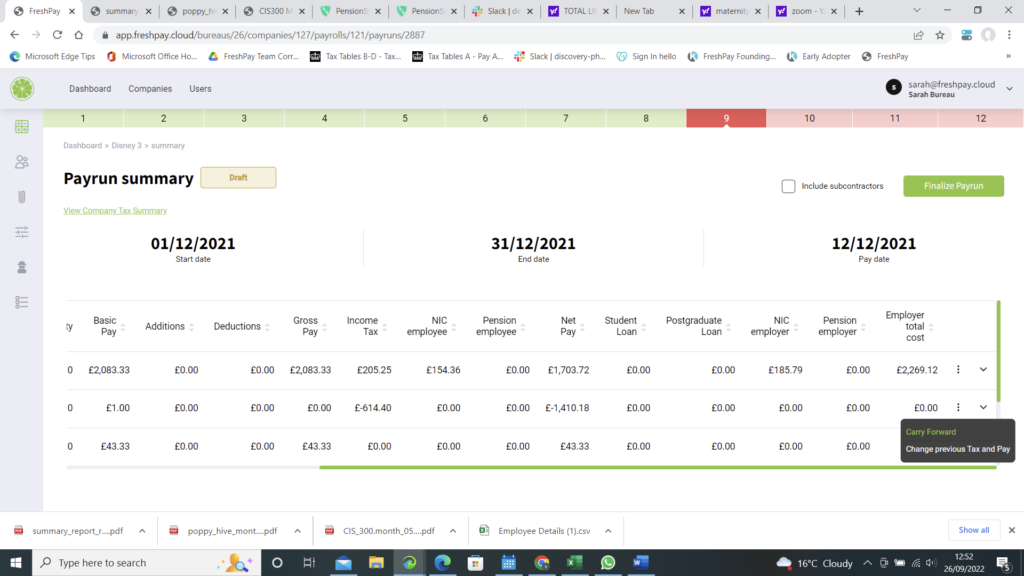
payrun screen tax refund

This will then carry the tax refund to the next month

If you wish to cancel the tax refund being carried forward, select the dots again >> select cancel carry forward
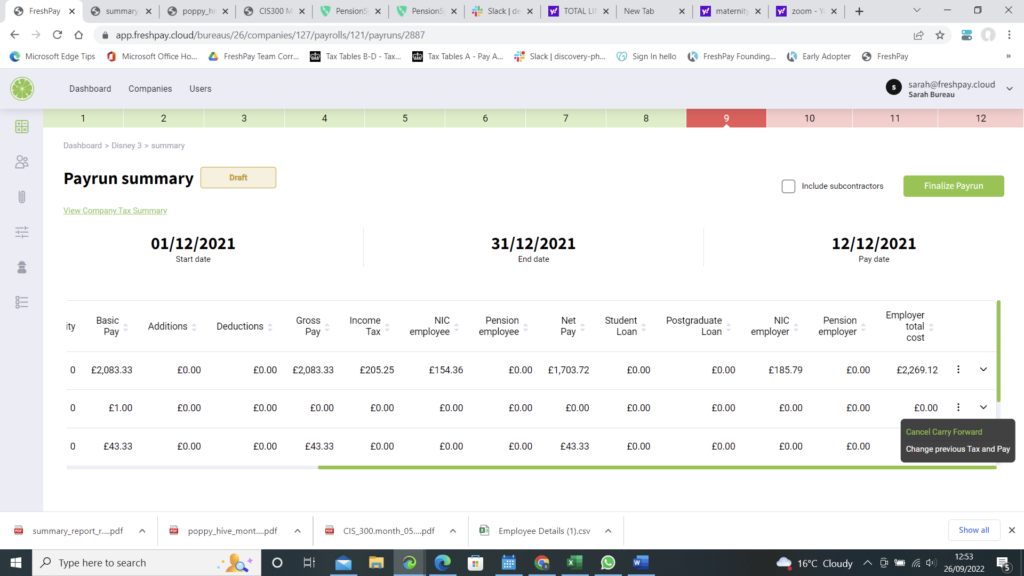
payrun screen tax refund carried forward

Updated on May 3, 2026
Uploading an Employee CSV FileAdding a P45
FreshPay-Logo-Colour-Light-RGB
Get in touch
Phone +44 (0)1403 599 355
Email

hello@freshpay.cloud
support@freshpay.cloud

Address

2 Pondtail Farm, Coolham Road,
West Grinstead, Horsham,
West Sussex RH13 8LN

Product Features Why FreshPay Integrations Pricing Blog Contact
Support How To Guides Migration Service Support Sessions YouTube Channel FAQS
Join the FreshPay community

Be the first to hear about the latest FreshPay updates and improvements.

© 2026 FreshPay Ltd. All Rights Reserved. Website by Space Five
Privacy Policy Term and Conditions